 Can visually stunning content solely rely on the richness of design when it is meant to cross borders?
Apart from being translated into different languages, the content must also be aesthetically pleasing for a diversified audience. With professional InDesign translation services, multilingual digital content can be distributed overseas to engage audiences, reflect high linguistic proficiency, and maintain the visual appeal across cultures.
In this blog, we will discuss how InDesign document translation services help to present multilingual digital content, including brochures, product catalogs, manuals, and eBooks.
What Is InDesign, and Why Is It Popular in Document Design?
InDesign, created by Adobe, is world-renowned desktop publishing software that is used to create professional layouts for both print and digital media. What makes InDesign stand out from the rest of the DTP software is the high control it provides users over typography, imagery, spacing, and overall design elements.
Some common uses of InDesign are:
- Print media and publishing
- Layout and typography of multipage documents
- Creating marketing and branding material
- Banners and posters for different occasions
Global brands prefer to use InDesign mainly due to the software’s ability to create complex, high-quality designs with minimal challenges. However, when brands need to create these designs in multiple languages, they start to venture into a tricky domain. Maintaining the visual formatting while changing the language requires a professional eye, and that’s where InDesign translation services come into play.
What Is InDesign Translation?
Professional InDesign translation services don’t just translate English into French or Japanese into German—they go much further beyond that. As in the original InDesign file, the layout is as important as the language; professionals need to be mindful of both.
This includes:
- Translation and localization of the text.
- Adjusting layouts for various scripts. For example, Arabic would need right-to-left adjustment, while Japanese would need vertical adjustment.
- Refining font size and space distribution after translation.
- Adapting the culture, which includes using region-specific images, taglines, or colors.
- Formatting the digital content according to requirements.
But translating and localizing an InDesign file isn’t enough. A well-translated document with an unsuitable layout is like a beautifully written letter in terrible handwriting.
What Are Some Challenges of Translating InDesign Files?
Translation of simple documents is a complicated art—and translating InDesign files just takes it a step further.
Some complexities involved in multilingual InDesign layout translation are:
- Text Expansion: In some cases, translated texts are much longer than the original text and can be up to 30% longer.
- Font Compatibility: Not all characters have a perfect alternative in different languages.
- Right-to-Left Layout: Several major languages, like Arabic and Hebrew, are written from right to left. While translating into these languages, it is both vital and complicated to flip the layout of the file.
- Typography Mismatch: Different regions prefer different font styles to ensure high engagement. And different font styles require special attention to the layout of the file.
- Non-Editable Text in Images: Several images contain texts that are generally non-editable. These images often require redesigning to achieve a complete and accurate translation.
And of course, the most essential component in translating an InDesign file is maintaining its aesthetic design.
InDesign may be an essential part of DTP, but there are several nuances to explore in desktop publishing services. Check out our detailed blog to explore these nuances. Feel free to visit: DTP Services: How to Create Accurate Multilingual Content?
ARE YOU LOOKING TO TRANSLATE DIGITAL INDESIGN CONTENT?
Contact us today for exceptional InDesign translation services and get a free quote!
Best Practices for Translating InDesign Files
A professional InDesign translation service puts in a meticulously thought-out approach to ensure precise, polished, and ready-to-publish files.
Some effective best practices used by expert InDesign translation services are:
Exporting the File to Translation-Friendly Formats
IDML (InDesign Markup Language) helps in producing efficient translation and is supported by most modern CAT tools.
How to export:
- Go to file
- Click on export
- Select IDML
Use of Various CAT (Computer-Assisted Translation) Tools
Modern CAT tools are essential for translating InDesign files. They support IDML files, maintain the formatted text, use translation memory for better consistency, and provide additional support like access to a terminology database.
Some modern CAT tools are:
- SDL Trados Studio
- memoQ
- Memsource
- Smartling
- Wordfast
- Across
Pre-Translation Cleanup in InDesign
Before exporting the file to IDML, always ensure the following:
- Paragraphs and character styles are precisely marked to make reformatting easier.
- If possible, avoid excessive use of manual text boxes.
- Anchor all the non-translatable elements like images and graphics.
- Conduct a spell check of the source text.
Post-Translation and Reimport
After the initial translation, it is necessary to reimport the file from IDML to IDD. Furthermore, check for text expansion, adjust the layout, and localize (if asked) the date format, currencies, units, and cultural references.
Utilize Cloud-Based Localization Platforms
Cloud platforms greatly help in efficient collaboration between translators, DTP operators, and reviewers. These platforms help with online CAT tools, version control, and review workflow.
Some cloud-based localization platforms are:
- Smartcat
- Lokalise
- Crowdin
- XTM Cloud
Use Scripts and Plugins
These plugins help to improve the translation procedure:
- Redokun: It is a cloud platform that supports simple UI and IDML and easily integrates with InDesign.
- Translate5: It is an open-source, web-based translation tool that helps translators speed up the conversion process.
- EasyCatalog: Best used for multilingual InDesign formatting, which contains structured content. This platform helps translators easily format the files back to their original structure.
Top-Notch QA and Review Tools
After the translation and formatting process has ended, it is vital to check consistency, detect untranslated terms or inaccurate lines, and identify formatting errors.
Some review tools that can be used for this purpose are:
- QA Distiller
- Xbench
- Verifika
How Can Somya Translators Help?
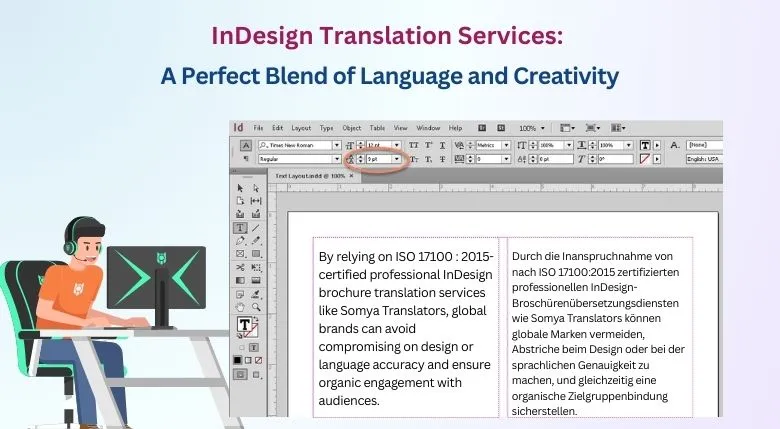
By relying on ISO 17100:2015-certified professional InDesign brochure translation services like Somya Translators, global brands can avoid compromising on design or language accuracy and ensure organic engagement with audiences.
We offer:
- Exceptionally high linguistic precision thanks to the team of expert native linguists.
- Experienced DTP specialists who can understand the nuances of multilingual typesetting services in translation.
- Thorough consistency across languages (Arabic, Hebrew, or Japanese) and capturing the true brand tone and style.
- Comprehensive end-to-end services and project handling, which involve every step from extraction to final delivery.
Whether it’s InDesign brochure translation or InDesign layout translation, Somya Translators ensures your content doesn’t just speak to the audience but resonates with them.
Trust us to transform your digital files into professional, polished, and multilingual content.
Contact us today for a free quote and let your design speak every language!